Summary: In this tutorial, you will learn how to use the Oracle DROP VIEW statement to drop a view from the database.
Introduction to Oracle DROP VIEW statement #
To remove a view from the database, you use the following DROP VIEW statement:
DROP VIEW [IF EXISTS] view_name
[CASCADE CONSTRAINT];Code language: SQL (Structured Query Language) (sql)In this syntax:
- First, specify the name of the view you want to delete after the
DROP VIEWkeywords. - Second, use the
IF EXISTSoption to conditionally delete a view only if it exists. - Third, use the
CASCADE CONSTRAINTclause to drop all referential integrity constraints that refer to primary key and unique keys in the view. If you don’t do so, then theDROP VIEWstatement will fail if such constraints exist.
If a view is referenced by other views, materialized views, or synonyms, Oracle will mark these objects asINVALID, but does not remove them.
If you want to explicitly delete a view in a specific schema, you can specify a schema name:
DROP VIEW [IF EXISTS] schema_name.view_name
[CASCADE CONSTRAINT];Code language: CSS (css)
If you skip the schema name, Oracle assumes that the view is in your own schema.
Oracle DROP VIEW Statement examples #
We’ll use the employees table from the sample database:
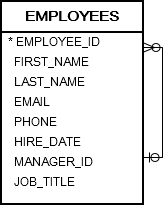
First, create a view named sales_employees based on the employees table:
CREATE OR REPLACE VIEW sales_employees
AS
SELECT
  *
FROM
  employees
WHERE
  job_title = 'Sales Representative';Code language: SQL (Structured Query Language) (sql)
The view returns only employees whose job titles are Sales Representative.
SELECT
  *
FROM
  sales_employees;Code language: SQL (Structured Query Language) (sql)
Second, create another view named sales_employees_contacts based on the sales_employees view:
CREATE VIEW sales_employees_contacts
AS
SELECT
    first_name,
    last_name,
    email,
    phone
FROM
    sales_employees;Code language: SQL (Structured Query Language) (sql)
The sales_employees_contacts view returns the only name, email, and phone of the sales employees:
SELECT * FROM sales_employees_contacts;Code language: SQL (Structured Query Language) (sql)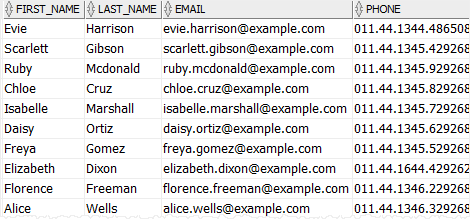
Third, attempt to drop the sales_employees view:
DROP VIEW IF EXISTS sales_employees;Code language: SQL (Structured Query Language) (sql)Since the sales_employees_contacts view depends on the sales_employees view, it became invalid when you drop the sales_employees view.
You can check the status of a view by querying data from the user_objects view. Note that the view name must be in uppercase.
SELECT
    object_name,
    status
FROM
    user_objects
WHERE
    object_type = 'VIEW'
    AND object_name = 'SALES_EMPLOYEES_CONTACTS';Code language: SQL (Structured Query Language) (sql)
Output:

The status of the the sales_employees_contacts view is INVALID.
Finally, drop the view sales_employee_contacts:
DROP VIEW IF EXISTS sales_employee_contacts;Code language: SQL (Structured Query Language) (sql)Summary #
- Use the Oracle
DROP VIEWstatement to drop a view from a database. - Use the
IF EXISTSoptional to conditionally drop a view only if it exists.

