Summary: in this tutorial, you will learn how to use SQLite COUNT function to get the number of items in a group.
Introduction to SQLite COUNT() function
The function COUNT() is an aggregate function that returns the number of items in a group.
For example, you can use the COUNT() function to get the number of tracks from the tracks table, the number of artists from the artists table, and so on.
The following illustrates the basic syntax of the COUNT function:
COUNT([ALL | DISTINCT] expression);Code language: SQL (Structured Query Language) (sql)Arguments
The COUNT function behaves according to the arguments that you pass into it and the option ALL or DISTINCT that you specify.
The following describes the meanings of ALL and DISTINCT options:
ALL: when you specify all, theCOUNT()function counts all non-null values include duplicates. TheCOUNT()function uses theALLoption by default if you skip it.DISTINCT: if you explicitly use theDISTINCToption, theCOUNTfunction counts only unique and non-null values.
The expression can be a column or an expression that involves columns to which the function COUNT() is applied.
SQLite provides another syntax of the COUNT() function:
COUNT(*)Code language: SQL (Structured Query Language) (sql)The COUNT(*) function returns the number of rows in a table, including the rows including NULL and duplicates.
SQLite COUNT() function illustration
First, create a table called t1 that has one column:
CREATE TABLE t1(c INTEGER);Code language: SQL (Structured Query Language) (sql)Second, insert five rows into the t1 table:
INSERT INTO t1(c)
VALUES(1),(2),(3),(null),(3);Code language: SQL (Structured Query Language) (sql)
Third, query data from the t1 table:
SELECT * FROM t1;Code language: SQL (Structured Query Language) (sql)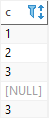
Fourth, use the COUNT(*) function to return the number of rows in the t1 table:
SELECT COUNT(*) FROM t1;Code language: SQL (Structured Query Language) (sql)
As you can see clearly from the output, the result set includes NULL and duplicate rows.
Fifth, use the COUNT(expression) to get the number of non-null values in the column c:
SELECT COUNT(c) FROM t1;Code language: SQL (Structured Query Language) (sql)
In this example, the COUNT(c) returns the number of non-null values. It counts the duplicate rows as separate rows.
Sixth, use the COUNT(DISTINCT expression) to get the number of unique and non-null values in column c:
SELECT COUNT(DISTINCT c) FROM t1;Code language: SQL (Structured Query Language) (sql)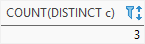
SQLite COUNT(*) examples
We will take the table tracks in the sample database to demonstrate the functionality of the COUNT(*) function.
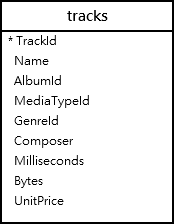
1) SQLite COUNT(*) example
To get the number of rows from the tracks table, you use the COUNT(*) function as follows:
SELECT count(*)
FROM tracks;Code language: SQL (Structured Query Language) (sql)count(*)
--------
3503Code language: plaintext (plaintext)2) SQLite COUNT(*) with WHERE clause example
The following statement uses the COUNT(*) function with a WHERE clause to find the number of tracks whose album id is 10:
SELECT COUNT(*)
FROM tracks
WHERE albumid = 10;Code language: SQL (Structured Query Language) (sql)COUNT(*)
--------
143) SQLite COUNT(*) with GROUP BY clause example
To get all the albums and the number of tracks in each album, you combine the COUNT(*) function with the GROUP BY clause:
SELECT
	albumid,
	COUNT(*)
FROM
	tracks
GROUP BY
albumid;Code language: SQL (Structured Query Language) (sql)AlbumId COUNT(*)
------- --------
1 10
2 1
3 3
4 8
5 15
6 13
7 12
8 14
9 8
10 14
...In this example:
- First, the
GROUP BYclause group tracks by album id. - Then, the
COUNT(*)function returns the number of tracks for each album or group of tracks.
4) SQLite COUNT(*) with HAVING clause example
The following uses the COUNT(*) in the HAVING clause to find albums that have more than 25 tracks:
SELECT
   albumid,
   COUNT(*)
FROM
   tracks
GROUP BY
   albumid
HAVING COUNT(*) > 25Code language: SQL (Structured Query Language) (sql)AlbumId COUNT(*)
------- --------
23 34
73 30
141 57
229 265) SQLite COUNT(*) with INNER JOIN clause example
In order to make the output of the above query more useful, you can include the album’s name column. To do this, you add INNER JOIN and ORDER BY clauses to the query like the following query:
SELECT
	tracks.albumid,
	title,
	COUNT(*)
FROM
	tracks
INNER JOIN albums ON
	albums.albumid = tracks.albumid
GROUP BY
	tracks.albumid
HAVING
	COUNT(*) > 25
ORDER BY
COUNT(*) DESC;Code language: SQL (Structured Query Language) (sql)AlbumId Title COUNT(*)
------- -------------- --------
141 Greatest Hits 57
23 Minha Historia 34
73 Unplugged 30
229 Lost, Season 3 26SQLite COUNT(DISTINCT expression) examples
Let’s take a look at the employees table from the sample database.
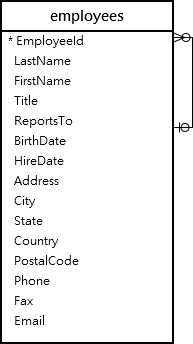
SELECT
	employeeid,
	lastname,
	firstname,
	title
FROM
employees;Code language: SQL (Structured Query Language) (sql)EmployeeId LastName FirstName Title
---------- -------- --------- -------------------
1 Adams Andrew General Manager
2 Edwards Nancy Sales Manager
3 Peacock Jane Sales Support Agent
4 Park Margaret Sales Support Agent
5 Johnson Steve Sales Support Agent
6 Mitchell Michael IT Manager
7 King Robert IT Staff
8 Callahan Laura IT StaffTo get the number of position titles, you pass the title column to the COUNT() function as follows:
SELECT COUNT(title)
FROM employees;Code language: SQL (Structured Query Language) (sql)COUNT(title)
------------
8However, to get the number of unique titles, you need to add the DISTINCT option to the COUNT() function as shown in the following statement:
SELECT COUNT(DISTINCT title)
FROM employees;Code language: SQL (Structured Query Language) (sql)COUNT(DISTINCT title)
---------------------
5In this tutorial, we have shown you how to use SQLite COUNT() function to count the number of items in a group.

