Summary: in this tutorial, you learn about the NULL and how to use the SQL IS NULL operator to test if a value is NULL or not.
Introduction to NULL in databases #
In the database world, NULL is a marker that indicates unknown or missing data in the database.
For example, if you don’t know the phone numbers of employees when you save the employee’s records, you can use NULL to represent unknown phone numbers.
The NULL is special because you cannot compare it with any value even with the NULL itself.
The following statement compares NULL with the number 5 and results in NULL:
SELECT
NULL = 5 AS result;Code language: SQL (Structured Query Language) (sql)Output:
 result
--------
 NULLCode language: SQL (Structured Query Language) (sql)
The NULL is not equal to itself, as shown in the following statement:
SELECT
NULL = NULL AS result;Code language: SQL (Structured Query Language) (sql)Output:
 result
--------
 NULLCode language: SQL (Structured Query Language) (sql)
You cannot use the equal to (=) to check if a value is NULL or not.
For example, the following statement attempts to find employees who do not have phone numbers:
SELECT
  first_name,
  last_name,
  phone_number
FROM
  employees
WHERE
phone_number = NULL;Code language: SQL (Structured Query Language) (sql)Output:
 first_name | last_name | phone_number
------------+-----------+--------------
(0 rows)Code language: SQL (Structured Query Language) (sql)
The IS NULL operator #
To test if a value is NULL or not, you use the IS NULL operator:
expression IS NULLCode language: SQL (Structured Query Language) (sql)The IS NULL operator returns true if the result of the expression is NULL. Otherwise, it returns false.
The IS NOT NULL negates the result of the IS NULL operator:
expression IS NOT NULLCode language: SQL (Structured Query Language) (sql)The IS NOT NULL returns false if the expression is NULL or true otherwise.
SQL IS NULL operator example #
We’ll use the employees table from the sample database for the demonstration.
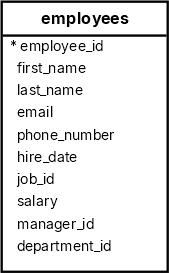
The following query uses the IS NULL operator to find the employees who do not have phone numbers:
SELECT
  first_name,
  last_name,
  phone_number
FROM
  employees
WHERE
phone_number IS NULL;Code language: SQL (Structured Query Language) (sql) first_name | last_name | phone_number
------------+------------+--------------
John | Russell | NULL
Karen | Partners | NULL
Jonathon | Taylor | NULL
Jack | Livingston | NULL
Kimberely | Grant | NULL
Charles | Johnson | NULLCode language: SQL (Structured Query Language) (sql)To find all employees who have phone numbers, you use IS NOT NULL operator as follows:
SELECT
  first_name,
  last_name,
  phone_number
FROM
  employees
WHERE
phone_number IS NOT NULL;Code language: SQL (Structured Query Language) (sql)Output:
 first_name  |  last_name  | phone_number
-------------+-------------+--------------
 Steven      | King        | 515.123.4567
 Neena       | Kochhar     | 515.123.4568
 Lex         | De Haan     | 515.123.4569
 Alexander   | Hunold      | 590.423.4567
 Bruce       | Ernst       | 590.423.4568
...Code language: SQL (Structured Query Language) (sql)
Summary #
NULLrepresents unknown or missing data in the database.- Use the
IS NULLto check if a value isNULLor not. - Use the
IS NOT NULLoperator to negate theIS NULLoperator.
Databases #
- PostgreSQL IS NULL operator
- Oracle IS NULL operator
- SQL Server IS NULL operator
- MySQL IS NULL operator
- SQLite IS NULL operator
- MariaDB IS NULL operator

