Summary: in this tutorial, you’ll learn how to use the SQL LEFT JOIN clause to merge rows from two tables.
Introduction to SQL LEFT JOIN clause #
The LEFT JOIN clause is an optional clause of the SELECT statement. The LEFT JOIN clause allows you to merge rows from two tables.
Here’s the syntax of LEFT JOIN clause:
SELECT
  column1,
  column2
FROM
  left_table
  LEFT JOIN right_table ON condition;Code language: SQL (Structured Query Language) (sql)
In this syntax:
- First, specify the left table in the
FROMclause (left_table) - Second, provide the right table you want to merge rows with the left table in the
LEFT JOINclause (right_table). - Third, define a
conditionfor matching rows between two tables after theONkeyword.
The LEFT JOIN clause matches every row from the left table (left_table) with every row from the right table (right_table) based on the condition.
If the condition is true, the LEFT JOIN merges the rows from both tables into a single row. Otherwise, it also combines the row from the left table with the row from the right table.
However, there is no matching row from the right table. In this case, the LEFT JOIN fills the columns of the row in the right table (right) with NULLs and merges it with the row from the left table.
Unlike an INNER JOIN clause, the LEFT JOIN clause always includes all rows from the left table.
The LEFT JOIN and LEFT OUTER JOIN are the same because the OUTER keyword is optional.
Understanding SQL left join #
Suppose you have two tables:
- The
Xtable has two columnsid(key) andx. - The
Ytable also has two columnsid(key) andy.
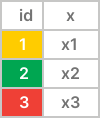
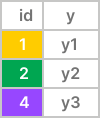
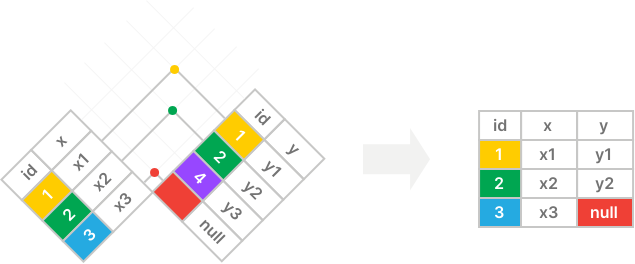
The left join matches the rows between the tables X and Y using the values in the id columns of both tables.
The left join includes all rows from the left table (X) and matching rows from the right table (Y); if there are no matching rows, it uses null for columns of the right table (Y):
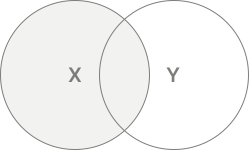
The following Venn diagram is another way to illustrate a left join:
SQL LEFT JOIN clause example #
Suppose we have two tables employees and departments.
The employees table has three columns employee_id, name, and department_id:
| employee_id | name | department_id |
|---|---|---|
| 1 | Jane | 1 |
| 2 | Bob | 2 |
| 3 | Maria | NULL |
The departments table has two columns department_id and department_name:
| department_id | department_name |
|---|---|
| 1 | Sales |
| 2 | Marketing |
The following query retrieves the employee_id and name from the employees table and department_name from the departments tables using a LEFT JOIN clause:
SELECT
  employee_id,
  name,
  department_name
FROM
  employees
LEFT JOIN departments ON departments.department_id = employees.department_id;Code language: SQL (Structured Query Language) (sql)Output:
 employee_id | name  | department_name
-------------+-------+-----------------
           1 | Jane  | Sales
           2 | Bob   | Marketing
           3 | Maria | NULLCode language: plaintext (plaintext)
How the query works.
- Step 1. The
LEFT JOINclause compares the value in thedepartment_idcolumn of theemployeestable with the value in thedepartment_idof thedepartmentstable. If they are equal, theLEFT JOINclause merges the rows from both tables into a single row. If not, theLEFT JOINfills inNULLfor columns of the row from thedepartmentstable and merge it with the row in theemployeestable. - Step 2. The query returns a row with the columns specified in the
SELECTclause.
The row #1 in the employees table (department_id 1) matches with the row #1 in the departments table (department_id 1). The LEFT JOIN clause combines the rows from both tables into a single row like this:
| employee_id | name | department_id | department_id | department_name |
|---|---|---|---|---|
| 1 | Jane | 1 | 1 | Sales |
The row #2 in the employees table (department_id 2) matches with the row #2 in the departments table (departement_id 2). The LEFT JOIN combines the rows from both tables into a single row:
| employee_id | name | department_id | department_id | department_name |
|---|---|---|---|---|
| 2 | Bob | 2 | 2 | Marketing |
The row #3 in the employees table does not match with any rows in the departments table. The LEFT JOIN clause fills in NULL for columns of the row in the departments table and combine with the row in the employees table to create the following intermediate row:
| employee_id | name | department_id | department_id | department_name |
|---|---|---|---|---|
| 3 | Maria | NULL | NULL | NULL |
After matching all rows from both tables, the LEFT JOIN clause returns the following intermediate result set :
| employee_id | name | department_id | department_id | department_name |
|---|---|---|---|---|
| 1 | Jane | 1 | 1 | Sales |
| 2 | Bob | 2 | 2 | Marketing |
| 3 | Maria | NULL | NULL | NULL |
The SELECT clause includes the employee_id, name, and department_name in the final result set:
| employee_id | name | department_name |
|---|---|---|
| 1 | Jane | Sales |
| 2 | Bob | Marketing |
| 3 | Maria | NULL |
Using Table Aliases #
To make the query more concise, you can use table aliases when joining the employees and departments tables:
SELECT
  employee_id,
  name,
  department_name
FROM
  employees e
LEFT JOIN departments d ON d.department_id = e.department_id;Code language: SQL (Structured Query Language) (sql)Output:
 employee_id | name  | department_name
-------------+-------+-----------------
           1 | Jane  | Sales
           2 | Bob   | Marketing
           3 | Maria | NULLCode language: plaintext (plaintext)
In this example, we assign the table alias e to the employees table and d to the departments table and references the department_id columns from both table using these aliases.
Finding non-matching rows in other tables #
Besides merging rows from two tables, you can use the LEFT JOIN clause to find rows in one table that do not have corresponding rows in other tables.
For example, the following query uses a LEFT JOIN clause to find the employees that do not belong to any departments:
SELECT
  employee_id,
  name,
  department_name
FROM
  employees e
  LEFT JOIN departments d ON d.department_id = e.department_id
WHERE
department_name IS NULL;Code language: SQL (Structured Query Language) (sql)Output:
 employee_id | name  | department_name
-------------+-------+-----------------
           3 | Maria | NULLCode language: plaintext (plaintext)
Practical SQL LEFT JOIN clause example #
Let’s look at the countries and locations tables from the HR sample database:

The countries table stores the country information and the locations table stores location data.
The locations table has a country_id foreign key column that references the country_id primary key column of the countries table.
Each country can have zero or more locations and each location belongs to one and only one country.
The following query uses a LEFT JOIN clause to select the street_address, city, and country name from the countries and locations table for the countries USA, UK, and China:
SELECT
  street_address,
  city,
  country_name
FROM
  countries c
  LEFT JOIN locations l ON l.country_id = c.country_id
WHERE
c.country_id IN ('US', 'UK', 'CN');Code language: SQL (Structured Query Language) (sql)Output:
              street_address              |        city         |       country_name
------------------------------------------+---------------------+--------------------------
 2014 Jabberwocky Rd                      | Southlake           | United States of America
 2011 Interiors Blvd                      | South San Francisco | United States of America
 2004 Charade Rd                          | Seattle             | United States of America
 8204 Arthur St                           | London              | United Kingdom
 Magdalen Centre, The Oxford Science Park | Oxford              | United Kingdom
 NULL                                     | NULL                | ChinaCode language: plaintext (plaintext)
The output indicates that China has no location in the locations table.
The following query finds the countries that do not have any locations in the locations table:
SELECT
  country_name
FROM
  countries c
  LEFT JOIN locations l ON l.country_id = c.country_id
WHERE
  l.location_id IS NULL
ORDER BY
country_name;Code language: SQL (Structured Query Language) (sql) country_name
--------------
Argentina
Australia
Belgium
Brazil
China
Denmark
Egypt
France
HongKong
India
Israel
Italy
Japan
Kuwait
Mexico
Netherlands
Nigeria
Singapore
Switzerland
Zambia
ZimbabweCode language: plaintext (plaintext)Joining three tables using a LEFT JOIN clause #
Here’s the database diagram that shows three tables: regions, countries, and locations from the HR sample database:
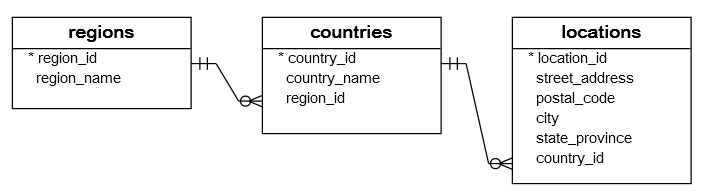
The following query retrieves data from the three tables using two LEFT JOIN clauses:
SELECT
  region_name,
  country_name,
  street_address,
  city
FROM
  regions r
  LEFT JOIN countries c ON c.region_id = r.region_id
  LEFT JOIN locations l ON l.country_id = c.country_id
ORDER BY
region_name;Code language: SQL (Structured Query Language) (sql)Output:
      region_name       |       country_name       |              street_address              |        city
------------------------+--------------------------+------------------------------------------+---------------------
 Americas               | United States of America | 2011 Interiors Blvd                      | South San Francisco
 Americas               | United States of America | 2014 Jabberwocky Rd                      | Southlake
 Americas               | Mexico                   | NULL                                     | NULL
 Americas               | Canada                   | 147 Spadina Ave                          | Toronto
 Americas               | Brazil                   | NULL                                     | NULL
 Americas               | United States of America | 2004 Charade Rd                          | Seattle
 Americas               | Argentina                | NULL                                     | NULL
 Asia                   | Australia                | NULL                                     | NULL
...Code language: plaintext (plaintext)
Summary #
- Use a
LEFT JOINclause to merge rows from two tables. TheLEFT JOINclause always includes rows from the first table (or left table) in the result set. - Use a
LEFT JOINclause and aWHEREclause with theIS NULLcondition to find unmatching rows in the left table.
Quiz #
Databases #
- PostgreSQL Left Join
- Oracle Left Join
- SQL Server Left Join
- MySQL Left Join
- SQLite Left Join
- Db2 Left Join
- MariaDB Left Join

