Summary: in this tutorial, you will learn how to use the SQL LIKE operator to test whether a value matches a pattern.
Introduction to SQL LIKE operator #
The LIKE operator is one of the SQL logical operators. The LIKE operator returns true if a value matches a pattern or false otherwise.
Here’s the syntax of the LIKE operator:
expression LIKE patternCode language: SQL (Structured Query Language) (sql)In this syntax, the LIKE operator tests whether the expression matches the pattern.
SQL provides you with two wildcard characters to construct a pattern:
-
%percent wildcard matches zero, one, or more characters -
_underscore wildcard matches a single character.
When you use the wildcard characters in a string, SQL will treat them specially.
The following table shows an example of using the % and _ wildcard characters:
| Expression | Meaning |
|---|---|
LIKE 'Kim%' | match a string that starts with Kim |
LIKE '%er' | match a string that ends with er |
LIKE '%ch%' | match a string that contains ch |
LIKE 'Le_' | match a string that starts with Le and is followed by one character e.g., Les, Len… |
LIKE '_uy' | match a string that ends with uy and is preceded by one character e.g., guy |
LIKE '%are_' | match a string that includes the string are and ends with one character. |
LIKE '_are%' | match a string that includes the string are, starts with one character and ends with any number of characters. |
Note that besides the % and _ wildcards, some database systems may support additional wildcard characters.
NOT LIKE #
To negate the result of a LIKE operator, you use the NOT operator:
expression NOT LIKE patternCode language: SQL (Structured Query Language) (sql)The NOT LIKE operator returns true if the expression doesn’t match the pattern or false otherwise.
Escape character #
To match a string that contains wildcard characters for example 10%, you need to instruct the LIKE operator to treat the % in 10% as a regular character.
To do that, you can explicitly specify an escape character after the ESCAPE clause:
expression LIKE pattern ESCAPE escape_characterCode language: SQL (Structured Query Language) (sql)For example:
value LIKE '%10!%%' ESCAPE '!'Code language: SQL (Structured Query Language) (sql)In this example, the ! is an escape character which instructs the LIKE operator to treat the % appear immediately after it as a regular character.
In practice, you often use the LIKE operator in WHERE clause to filter rows whose values match a pattern. Additionally, you can use the LIKE operator in the WHERE clause of the UPDATE and DELETE to filter rows to update and delete.
SQL LIKE operator examples #
We’ll use the employees table in the sample database for the demonstration.
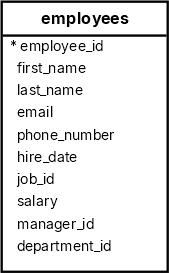
Finding names starting with a string #
The following query uses the LIKE operator to find all employees with the first names starting with the string Da :
SELECT
  first_name,
  last_name
FROM
  employees
WHERE
  first_name LIKE 'Da%'
ORDER BY
first_name;Code language: SQL (Structured Query Language) (sql) first_name | last_name
------------+-----------
Daniel | Faviet
David | AustinCode language: plaintext (plaintext)Finding names ending with a string #
The following statement uses the LIKE operator to find employees whose first names end with er:
SELECT
  first_name,
  last_name
FROM
  employees
WHERE
  first_name LIKE '%er'
ORDER BY
first_name;Code language: SQL (Structured Query Language) (sql) first_name | last_name
------------+-----------
Alexander | Hunold
Alexander | Khoo
Jennifer | WhalenCode language: plaintext (plaintext)Finding names that include a string #
The following query uses the LIKE operator to find employees whose first names contain the word an:
SELECT
  first_name,
  last_name
FROM
  employees
WHERE
  first_name LIKE '%an%'
ORDER BY
first_name;Code language: SQL (Structured Query Language) (sql) first_name | last_name
-------------+-----------
Alexander | Khoo
Alexander | Hunold
Daniel | Faviet
Diana | Lorentz
Hermann | Baer
Jose Manuel | Urman
Nancy | Greenberg
Shanta | Vollman
Susan | MavrisCode language: plaintext (plaintext)Using the _ wildcard character #
The following query uses the LIKE operator to find employees whose first names start with Jo and are followed by two characters:
SELECT
  first_name,
  last_name
FROM
  employees
WHERE
  first_name LIKE 'Jo__'
ORDER BY
first_name;Code language: SQL (Structured Query Language) (sql) first_name | last_name
------------+-----------
John | Chen
John | RussellCode language: plaintext (plaintext)Combining wildcard characters #
The following query uses the LIKE operator with the % and _ wildcard characters to find employees whose first names start with any number of characters and are followed by a single character:
SELECT
  first_name,
  last_name
FROM
  employees
WHERE
  first_name LIKE '%are_'
ORDER BY
first_name;Code language: SQL (Structured Query Language) (sql) first_name | last_name
------------+------------
Karen | Colmenares
Karen | PartnersCode language: plaintext (plaintext)SQL NOT LIKE operator example #
The following example uses the NOT LIKE operator to find all employees whose first names start with the letter S but not start with Sh:
SELECT
  first_name,
  last_name
FROM
  employees
WHERE
  first_name LIKE 'S%'
  AND first_name NOT LIKE 'Sh%'
ORDER BY
first_name;Code language: SQL (Structured Query Language) (sql) first_name | last_name
------------+-----------
Sarah | Bell
Sigal | Tobias
Steven | King
Susan | MavrisCode language: plaintext (plaintext)Summary #
- The
LIKEoperator returnstrueif a value matches a pattern orfalseotherwise. - Use the
NOToperator to negate theLIKEoperator. - Use the
%wildcard to match one or more characters - Use the
_wildcard to match a single character.
Databases #
- PostgreSQL LIKE operator
- Oracle LIKE operator
- SQL Server LIKE operator
- MySQL LIKE operator
- SQLite LIKE operator
- Db2 LIKE operator
- MariaDB LIKE operator

