Summary: in this tutorial, you will learn how to use the SQL WHERE clause to filter rows based on one or more conditions.
Introduction to SQL WHERE clause #
To select specific rows from a table based on one or more conditions, you use the WHERE clause in the SELECT statement.
Here’s the syntax of the WHERE clause:
SELECT
    column1, column2, ...
FROM
    table_name
WHERE
    condition;Code language: SQL (Structured Query Language) (sql)
The WHERE clause appears immediately after the FROM clause. It contains one or more Boolean expressions that evaluate each row in the table.
If a row that causes the condition evaluates to true, the query will include that row in the result set.
Note that SQL has three-valued logic which are true, false, and NULL. It means that if a row causes the condition to evaluate to false or null, the query will not include that row in the result set.
The condition that follows the WHERE clause is also known as a predicate. You can use operators to form a flexible condition to filter rows.
The following table shows the SQL comparison operators:
| Operator | Meaning |
|---|---|
| = | Equal to |
| <> (!=) | Not equal to |
| < | Less than |
| > | Greater than |
| <= | Less than or equal |
| >= | Greater than or equal |
To construct a simple condition, you use one of the operators above with two operands that can be column name on one side and a literal value on the other, for example:
salary > 1000Code language: SQL (Structured Query Language) (sql)It asks the question: “Is salary greater than 1000?”.
Or you can use column names on both sides of an operator such as:
min_salary < max_salaryCode language: SQL (Structured Query Language) (sql)This expression asks another question: “Is the minimum salary less than the maximum salary?”.
The literal values you use in a condition can be numbers, strings, dates, and times. Here are typical formats:
- Numbers can be an integer or a decimal without any formatting e.g.,
100,123.45 - Strings are surrounded by single quotes e.g.,
'100','John Doe'. - Dates depend on database systems, but the common format is
'yyyy-mm-dd'. - Time uses
'HH:MM:SS'to represent a time value.
Besides the SELECT statement, you can use the WHERE clause in the UPDATE or DELETE statement to specify which rows to update or delete.
SQL WHERE clause examples #
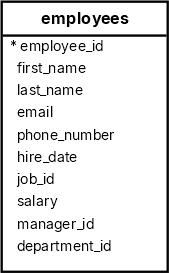
We will use the employees table to demonstrate how to filter rows using the WHERE clause.
Filtering rows based on numeric values #
The following query uses the WHERE clause to select employees who have salaries greater than 14,000 :
SELECT
  employee_id,
  first_name,
  last_name,
  salary
FROM
  employees
WHERE
  salary > 14000
ORDER BY
salary DESC;Code language: SQL (Structured Query Language) (sql)Output:
 employee_id | first_name | last_name |  salary
-------------+------------+-----------+----------
         100 | Steven     | King      | 24000.00
         101 | Neena      | Kochhar   | 17000.00
         102 | Lex        | De Haan   | 17000.00Code language: plaintext (plaintext)
Filtering rows based on string values #
The following statement uses the WHERE clause to find employees with the last name is Chen.
SELECT
  employee_id,
  first_name,
  last_name
FROM
  employees
WHERE
last_name = 'Chen';Code language: SQL (Structured Query Language) (sql)Output:
 employee_id | first_name | last_name
-------------+------------+-----------
         110 | John       | ChenCode language: plaintext (plaintext)
When comparing values, SQL matches string case-sensitively.
Filtering rows based on dates #
The following query uses a WHERE clause to find all employees who joined the company after January 1, 1999 :
SELECT
  first_name,
  last_name,
  hire_date
FROM
  employees
WHERE
  hire_date >= '1999-01-01'
ORDER BY
hire_date DESC;Code language: SQL (Structured Query Language) (sql) first_name | last_name | hire_date
------------+------------+------------
Charles | Johnson | 2000-01-04
Luis | Popp | 1999-12-07
Karen | Colmenares | 1999-08-10
Kimberely | Grant | 1999-05-24
Diana | Lorentz | 1999-02-07Code language: plaintext (plaintext)If you want to find the employees who joined the company in 1999, you can use one of the following options:
- Use the
EXTRACTfunction to extract the year from thehire_datecolumn and use the equal to (=) operator in the expression. - Use two expressions with the
ANDoperator that compares the hire date withJan 1, 1999andDec 31, 1999. - Use the
BETWEENoperator.
The following statement uses the EXTRACT function to get the year and compare it with 1999 in the WHERE clause:
SELECT
  first_name,
  last_name,
  hire_date
FROM
  employees
WHERE
  EXTRACT(YEAR FROM hire_date) = 1999
ORDER BY
hire_date DESC;Code language: SQL (Structured Query Language) (sql)Output:
 first_name | last_name  | hire_date
------------+------------+------------
 Luis       | Popp       | 1999-12-07
 Karen      | Colmenares | 1999-08-10
 Kimberely  | Grant      | 1999-05-24
 Diana      | Lorentz    | 1999-02-07Code language: plaintext (plaintext)
Summary #
- Use the
WHEREclause to filter rows based on one or more conditions.
Databases #
- PostgreSQL WHERE clause
- Oracle WHERE clause
- SQL Server WHERE clause
- MySQL WHERE clause
- SQLite WHERE clause
- Db2 WHERE clause
- MariaDB WHERE clause

